仕様駆動型開発を簡単に導入できる「OpenSpec」を利用して一貫性のあるコードを生成する方法


OpenSpecはAIを利用したコーディングの手法「仕様駆動型開発(Specification-Driven Development、略してSDD)」を簡単に導入できるツールで、仕様から一貫性のあるコードを自動生成できます。
GitHub - Fission-AI/OpenSpec: Spec-driven development for AI coding assistants.
OpenSpec - A lightweight spec‑driven framework
https://openspec.dev/

仕様駆動型開発とは、ソフトウェア開発において詳細に定義したシステムの仕様に基づいてコードを生成・実装する手法です。開発プロセス全体で一貫性が保たれ、バグが減少します。
OpenSpecを利用するためには、node.jsのバージョン20.19.0以上が必要です。Windows環境では、Git BashやWSLなどのターミナルを使用して、以下のコマンドでOpenSpecをインストールします。
npm install -g @fission-ai/openspec@latest
利用できる環境は以下の通りです。
・Claude Code
・Cursor
・Factory Droid
・OpenCode
・Kilo Code
・Windsurf
・Codex
・GitHub Copilot
・Amazon Q Developer
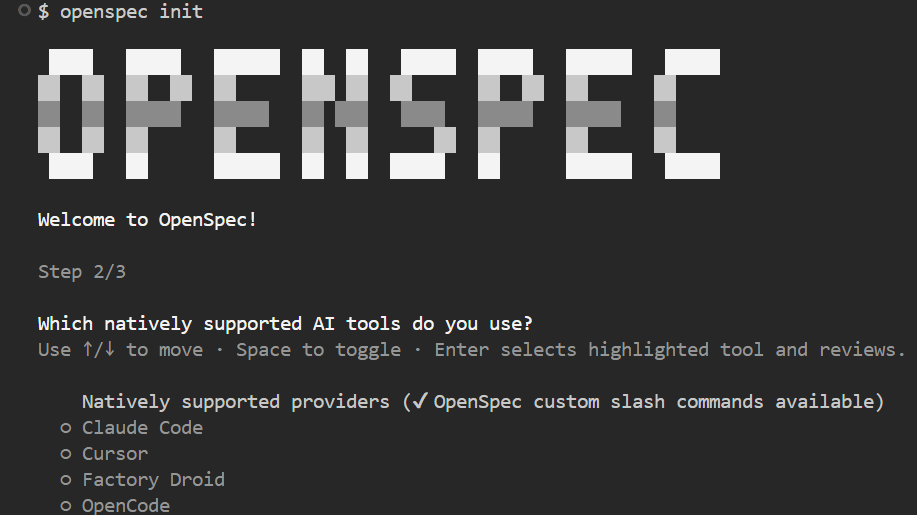
プロジェクトのルートフォルダで以下のコマンドを実行し、OpenSpecの初期設定を行います。
openspec init
利用環境を選択します。

今回はwebブラウザーで動くキッチンタイマーアプリを作成します。openspecフォルダにあるproject.mdファイルを編集し、キッチンタイマーの仕様やコーディングルールなどを記述します。最初は、目的とその時点で思い付く仕様を記述し、残りの項目はAIチャットで補完していく形で大丈夫です。
# Project Context
## Purpose
Provide a simple and highly visible timer for use in home and commercial kitchens via a web browser.
- Place buttons to set 1 minute, 3 minutes, and 5 minutes; pressing a button starts a countdown from that time.
- During the countdown, display the remaining time prominently.
- If a button is pressed again during the countdown, reset the timer and start a new countdown.
## Tech Stack
- HTML5
- JavaScript(ES6)
- CSS3
次に、Github Copilot Chatの場合は/openspec-proposalコマンドを利用し「UIを作成する」と提案します。
/openspec-proposal UIを作成する
すると、openspecフォルダ内のchangesフォルダに提案内容から自動的に与えられた英語名「create-ui」フォルダが作成され直下に各種ファイルが生成されます。

作成された各種ファイルの内容は以下の通りです。
・proposal.md
# Proposal: create-ui
## Summary
Add a simple, highly visible kitchen timer UI for web browsers, as described in openspec/project.md. This is a new capability; no prior UI implementation exists.
## Motivation
The project currently lacks any user interface. Implementing the timer UI is essential for delivering the core value proposition.
## Scope
- HTML, CSS, JS for timer UI
- 1/3/5 minute buttons
- Large countdown display
- Button press resets timer during countdown
## References
- See openspec/project.md (Purpose section)
・design.md
# Design: create-ui
## Overview
A minimal, single-page web app using vanilla HTML/CSS/JS. No frameworks. All logic client-side. Simple, accessible layout for kitchen use.
## Reasoning
- No prior UI, so no migration needed
- Vanilla stack for simplicity and maintainability
- Large, clear display for kitchen visibility
- Buttons reset timer as per requirements
・tasks.md
# Tasks for create-ui
1. Scaffold html/, html/index.html, html/style.css, html/timer.js
2. Implement UI layout: buttons (1/3/5 min), large timer display
3. Implement timer logic in JS (countdown, reset on button press)
4. Style for visibility and usability (CSS)
5. Manual browser test: verify all scenarios
6. Add/validate spec.md for UI requirements
・spec.md
# Spec: timer-ui
## ADDED Requirements
### Requirement: Timer UI for Kitchen Use
A simple, highly visible timer UI SHALL be provided in the browser for kitchen use.
#### Scenario:
- User opens the app in a browser
- Sees buttons for 1, 3, and 5 minutes
- Presses a button; countdown starts from that time
- Remaining time is displayed in large font
- Pressing a button during countdown resets and starts new countdown
### Requirement: Accessible and Usable Layout
The UI SHALL be easy to operate and read in kitchen environments.
#### Scenario:
- Buttons are large and clearly labeled
- Timer display is prominent
- Works on desktop and tablet browsers
内容に不足や修正点があれば、AIチャットで補完していくと必要な変更箇所を自動的に修正してくれるので便利です。もちろん、直接書き換えても構いません。内容が固まったら「検証を行ってください」と指示するとOpenSpecが内容を検証します。

検証が完了したら、次に/openspec-applyコマンドでコードを生成します。
/openspec-apply
自動的にコードが生成されていきます。

今回は1回の指示でキッチンタイマーアプリが完成しました。もしエラーが発生した場合でも、AIチャットで修正を指示すれば自動的に修正してくれます。

これで良いと判断したら、/openspec-archiveコマンドで内容をアーカイブします。
/openspec-archive
アーカイブした時点で一連の提案からの作業が完了しています。以後、create-uiフォルダの内容は変更してはいけません。将来的に仕様変更が発生した場合は、新たに提案を行います。1つ1つの提案ごとにchangesディレクトリの下に新しいフォルダが作成されることで、追加、変更作業の履歴が管理されます。
今回は非常にシンプルなWebアプリを例にしましたが、OpenSpecは一部の作業のみ採用するという利用方法も可能です。履歴を残したい部分だけOpenSpecを利用し、他の部分は通常の開発手法で進めることもできます。これにより、プロジェクト全体の効率化と品質向上が期待できます。関連記事
Claude Codeのウェブアプリ版が登場、GitHubリポジトリやネットワークサーバーへのアクセス権限を付与可能に - GIGAZINE
AIエージェントに専門知識や組織的な文脈などを事前に与えて「スキル」として呼び出せる「Claude Skills」をAnthropicがリリース - GIGAZINE
Anthropicが軽量コスト重視の「Claude Haiku 4.5」を発表、Claude Sonnet 4と同等のパフォーマンスを3分の1のコストと2倍以上の速度で実現 - GIGAZINE
GoogleがAIでアプリの脆弱性を発見できるAIエージェント「CodeMender」を発表 - GIGAZINE
「GPT-5-Codex」登場、GPT-5のコーディング能力をさらに向上させてエディターやターミナルでの作業をサポート - GIGAZINE
